
Using OAuth 2.0 for Google APIs
OAuth has become an incredibly popular way to manage authentication and authorization for apps — mobile, desktop, and web. What is OAuth? Well according to the OAuth site OAuth is…
An open protocol to allow secure authorization in a simple and standard method from web, mobile and desktop applications.
Well, to be honest that’s pretty general and might not exactly clear everything up if you’re new to OAuth. Don’t worry though. In what follows, we are going to show some really simple implementations in a couple of different languages that will hopefully help you get a better grasp on what OAuth is and whether or not it’s a good choice for you to use on your website or in your application.
We’ll be using Google’s OAuth for a demonstration, but there are other sites that use OAuth. There’s OAuth for Twitter, there’s OAuth for Facebook, there’s OAuth for LinkedIn, and there’s OAuth for a number of other different sites. Have you ever come to a website or started an app and seen the “Sign in with Google” or the “Sign in with Facebook” button(s)? Chances are, you have. How can a site or application support multiple different types of “sign-ins” like this?
What is OAuth?
Normally, when you sign in to a site or an app you give your username or email and your password. These get sent to the server that’s hosting the site and checked against the entry in the site’s database to see if the credentials that you provided match the ones that the site has on record. If they do you are logged in where get access to certain parts of the site where you can “do stuff” (upload photos, customize your profile, send friend requests, or whatever it is that the site does). This is a fairly straightforward implementation that a lot of sites use.
But how could you make it so that your site allows a user to log in and get access to privileged areas of your site by signing into Google or Facebook? Your site is not hosted on Google or Facebook. How does can your site (on a different server somewhere else) know if a user is signed into Google or Facebook (which have their own servers). To do that, there has to be some form of communication between your site and Google or Facebook. This is where OAuth comes in to play.
When a user clicks a “Sign in with Google” button on your website, for example, your site has to respond to this click. What your site needs to do is run some code (fortunately, code provided by Google) that handles all of this for you. The only thing that you have to do is set some key values in the code that you get when you create an app on Google.* This is how Google is able to distinguish that the request is coming from your app or website and not one of the other millions of other apps/websites that use Google to sign in. It is here where you’ll need to set what “level” of access your website will need from the user’s Google account (called scopes). Maybe you just need some basic information (like the user’s name). But maybe you want to use the Google API for Calendar and post events from your website or app to the users Google Calendar. If that’s the case, you’ll need to specify that your app will need to access the user’s calendar. Maybe you want to use the Mirror API so you can create apps that support Google Glass, the Google glasses. To learn more about this you can view the Google glass video here.
Whatever, level of access your site needs to get at in the user’s Google account, you’ll want to specify that here. You’ll see all of this in action a bit later.
Note: Perhaps the term “create an app” is a bit misleading. You’re not creating a full blown app on Google. You’re only creating a tiny location or “doorway” based on some ID keys that allows your site to communicate with Google. All the functionality for your app is in your own code (not on Google).
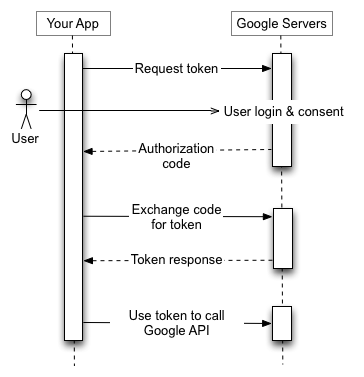
So, the user will click on the “Sign in with Google” button and Google will check if the user who clicked the button is signed into Google on their computer. If they are not, Google will give them a prompt to sign in. If they are signed in (or after they sign in if they weren’t before).
The user will then be informed about what parts of their account your app will need to access. Recall that you set this in your code previously. Once a user allows this access Google will send a block of information back to your site based on the user’s sign in and allowing your site to access their information hosted on Google. Remember that Google knows how to send it to your site (and not some other site) because you gave Google the key ID value for your app that you created on Google. The part that you’re responsible for as a developer is how you’re going to handle this next.
Note: If ever you want to revoke access for any Google App that you allow access for you can go to your Google Dashboard at https://www.google.com/dashboard/ after you sign into Google. Under the “Account” section of your dashboard there should be a “Websites authorized to access the account” link. Click on this and you’ll be able to “Revoke Access” for apps that are listed there.
This whole process of authenticating a user, prompting them to approve your site or application allowing access to their Google account information is, essentially, what OAuth is. It’s a process (or proticol) for authenticating a user.
The information that Google gives you back is an “OAuth token”, a big chunk of data that’s a bunch of gobbledy-gook unusable to you, the developer. Google now requires you to send this token to other places on Google to get the information about the user that your site or application needs. Google will determine if that token is valid (and can get the information) and send the information back to your site or application.
So all of that is a bit verbose. Here is the Google diagram for OAuth (which BTW needs a bit more drop-shadow IMO. They don’t have enough)…
But if lengthy descriptions and/or diagrams are not your cup of tea (hey, some people learn best by example) there are some examples below of OAuth in action.
Google OAuth in JavaScript
So here is the JavaScript implementation of Google OAuth. The JavaScript documentation for OAuth can be found here
var accessToken;
var config = {
    'client_id': '687464012649.apps.googleusercontent.com',
    'scope': 'https://www.googleapis.com/auth/userinfo.profile',
};
function auth() {
    gapi.auth.authorize(config, function() {
        accessToken = gapi.auth.getToken().access_token;
        console.log('We have got our token....');
        console.log(accessToken);
        console.log('We are now going to validate our token....');
        validateToken();
    });
}
function validateToken() {
    $.ajax({
        url: 'https://www.googleapis.com/oauth2/v1/tokeninfo?access_token=' + accessToken,
        data: null,
        success: function(response){
            console.log('Our token is valid....');
            console.log('We now want to get info about the user using our token....');
            getUserInfo();
        },
        error: function(error) {
            console.log('Our token is not valid....');
        },
        dataType: "jsonp"
    });
}
function getUserInfo() {
    $.ajax({
        url: 'https://www.googleapis.com/oauth2/v1/userinfo?access_token=' + accessToken,
        data: null,
        success: function(response) {
            console.log('We have gotten info back....');
            console.log(response);
            $('#user').html(response.name);
        },
        dataType: "jsonp"
    });
}
The only thing you’d have to change is the client ID value in the config variable at the top to the client ID of your own app.
Google OAuth in PHP
What about other languages like PHP? To use the PHP libraries you’ll have to download the Google API PHP Client and include the library in your project. The great thing is that this download includes some great examples of using PHP OAuth where you and just take the code and drop it into your project. The Wiki also has a good walkthrough on how to do everything from creating an app on Google to implementing code so that a user can log into your PHP website or application with Google
Below is a Google PHP OAuth implementation (adapted from one of the examples included in the Google API PHP Client)…
<?php
require_once 'google-api-php-client/src/Google_Client.php';
require_once 'google-api-php-client/src/contrib/Google_Oauth2Service.php';
session_start();
$client = new Google_Client();
$client->setApplicationName("Sandbox Application");
$client->setClientId('687464012649.apps.googleusercontent.com');
$client->setClientSecret('5wDB6alon98tEyHXP7CxZRiL');
$client->setRedirectUri("http://".$_SERVER["HTTP_HOST"].$_SERVER['PHP_SELF']);
$client->setDeveloperKey('AIzaSyAJ5678gq3qE3Ox_snp3wfCZ9IozjaRvYA');
$oauth2 = new Google_Oauth2Service($client);
if (isset($_GET['code'])) {
  $client->authenticate($_GET['code']);
  $_SESSION['token'] = $client->getAccessToken();
  $redirect = 'http://' . $_SERVER['HTTP_HOST'] . $_SERVER['PHP_SELF'];
  header('Location: ' . filter_var($redirect, FILTER_SANITIZE_URL));
  return;
}
if (isset($_SESSION['token'])) {
 $client->setAccessToken($_SESSION['token']);
}
if (isset($_REQUEST['logout'])) {
  unset($_SESSION['token']);
  $client->revokeToken();
}
if ($client->getAccessToken()) {
	$user = $oauth2->userinfo->get();
	$name = filter_var($user['name'], FILTER_SANITIZE_EMAIL);
	$personMarkup = "$name";
	$_SESSION['token'] = $client->getAccessToken();
}
else {
	$authUrl = $client->createAuthUrl();
}
?>
<!doctype html>
<html>
<head><meta charset="utf-8"></head>
<body>
<h1>Sample App</h1>
<p>
<?php if(isset($personMarkup)): ?>
<?php print $personMarkup ?>
<?php endif ?>
</p>
<p>
<?php
  if(isset($authUrl)) {
    print "<a class='login' href='$authUrl'>Connect Me!</a>";
  } else {
   print "<a class='logout' href='?logout'>Logout</a>";
  }
?>
</p>
</body>
</html>
Again, here, you’d want to replace all of the values at the top with the generated values from your own app that you create on Google.
Other Languages
Using Google OAuth is not limited to JavaScript and PHP. You can find resources for many different languages on the Using OAuth 2.0 to Access Google APIs page here. (Look towards the bottom).
Conclusion
Hopefully you have found this general introduction to using Google APIs OAuth 2.0 useful. We just used Google as an example to demonstrate OAuth protocol. As mentioned before, other sites like Facebook and Twitter have their own OAuth implementations as well. With the ubiquity of social networks, this can be a decent way to authenticate and authorize users of your website or application. You just have to decide whether or not it’s a good fit for you.





2 Responses to Using OAuth 2.0 for Google APIs